CVs: LaTeX, Word, HTML & the personal brief
CV Clanker tailors a copy of a CV you upload; it edits the content of that document rather than generating a new one. The upload can be LaTeX, Word or HTML.
You choose the format once per user profile, in the onboarding wizard. It is fixed for that user profile, but you can keep several user profiles, each with its own format. You upload and inspect your CV on the My CV page, or in the CV step of onboarding.
LaTeX CVs
Upload a single .tex, or a .zip containing your main file plus anything it pulls in with \input{} / \include{} (class files, fonts and images included).
On upload, CV Clanker compiles your source with Tectonic, has the LLM turn it into a template with editable fields (summary, bullets, skills, dates, and so on), drafts a personal brief, and checks that the template reproduces your CV’s text exactly. This can take a few attempts. If it still doesn’t match, the upload is rejected and the page shows Upload failed with what each attempt produced; there is no partial acceptance. The steps are in The LaTeX upload gate.
If an upload is rejected, it is usually an unusual macro or a package Tectonic can’t resolve. Compile the .tex with Tectonic locally first (if Tectonic can’t build it, CV Clanker can’t either), prefer standard packages, and make sure every \input{} file is in the .zip. The first compile on a fresh install downloads the LaTeX packages your CV uses, so it is much slower than later ones.
Word (.docx) CVs
With a Word profile you download a .docx; the PDF is a preview only.
On upload, CV Clanker has the LLM pick out the tailorable text and accepts the file only if your document’s text comes through unchanged and it converts to PDF (see Word CVs). Password-protected or legacy .doc files, documents with macros, unresolved tracked changes, or fields that pull in external content are rejected.
The tailored .docx keeps your original fonts and layout, with only the tailored text changed.
Note: cover letters are LaTeX only. A Word profile tailors the Word CV, but its cover letters use the LaTeX substrate — see Tailoring.
HTML CVs
Meant for simple CVs written as a web page, such as the ones AI agents produce. Upload a single .html page, or a .zip with the page and every file it uses (stylesheets, fonts, images) linked by relative paths.
The page must be self-contained: nothing loaded from the internet and no scripts. An upload that links a font, image or stylesheet on the web is rejected; put those files in a .zip with the page instead. Links that change nothing in the PDF (icons, preloads) are dropped, and so are OS junk files in a zip.
On upload, CV Clanker has the LLM pick out the tailorable text and accepts the page only if it still holds exactly your text and prints to PDF cleanly (see HTML CVs).
Tailored text may only use the inline formatting (bold, italics, links and so on) your CV already uses. You download the tailored page in the shape you uploaded it — the .html, or the .zip with the page swapped in and every other file kept. The PDF is printed by Chromium, at A4 unless the page sets its own @page size, and with a 1 cm margin unless the page sets its own.
Which format?
| LaTeX | Word | HTML | |
|---|---|---|---|
| You download | .docx (plus PDF preview) |
.html or .zip (plus PDF preview) |
|
| Best if | You already have a .tex résumé |
You work in Word / Google Docs and want an editable file to submit | Your CV is a web page, e.g. one an AI agent wrote |
| Cover letters | LaTeX | LaTeX | LaTeX |
| Hand-edit the template | Yes | No | No |
If you don’t already have a LaTeX CV, Word is usually simpler.
The My CV page
| Control | What it does |
|---|---|
| Templated PDF / Original PDF | Your CV rendered from the template, and your untouched upload, each in a new tab. They should read the same. |
| Extracted fields | Every field with its role and original text. If a role looks wrong, re-extract. |
| Re-extract | Runs the whole upload check again on the stored upload, for example after a bad extraction or a prompt change. Your brief is kept; if it fails, nothing changes. |
| Extraction prompt | The prompt used to extract this CV, with Save and Reset to default; Re-extract with this prompt tries an edited one. |
| Personal brief | Your brief, saved with Save changes. Regenerate brief replaces it with a fresh 100–400 word summary of your CV, after asking. |
| Templated LaTeX | LaTeX only: hand-edit the layout (a line break, spacing, a font size) and Save template. The edit must keep the same fields and must not add LaTeX errors; check Templated PDF afterwards. A later re-extract replaces hand edits, and PDFs already made for jobs keep the old layout until rendered again. |
| Compile log / Conversion log | The output of the last accepted render. |
The app works with one CV per user profile: the active CV is the one shown on My CV, and tailoring, scoring, cover letters and the ghostwriter all read it. To work with a different CV, use another user profile.
The personal brief
The brief is long-form, first-person text describing things a CV doesn’t include: side projects, tools used briefly, context behind a role.
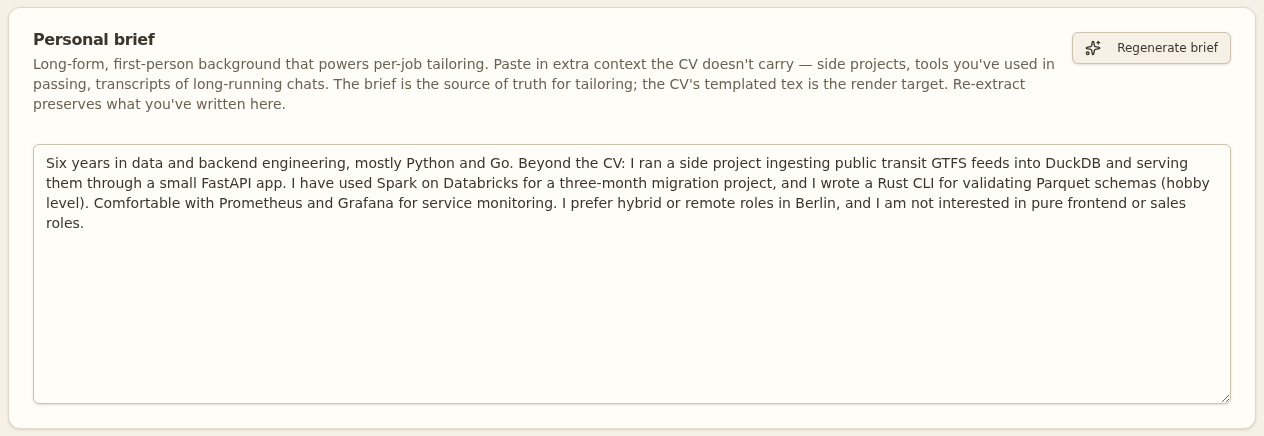
Tailoring draws only on the brief and the job description, and fit scoring reads the brief too. With little in the brief there’s little for tailoring to reference; with more, there’s more it can use. It isn’t used to invent experience.
Writing one:
- First person and concrete: technologies, scale, outcomes.
- Include what didn’t fit on the CV.
- Accuracy and completeness matter more than polish.
CV Clanker drafts one from your CV when you upload it, as a starting point to edit. The tailoring workspace’s Personal Brief tab edits the same brief (a change there applies to every job), and the ghostwriter can propose additions to it.
Locked fields
Fields you don’t want rewritten for a job (a name, a specific title, a credential) can be locked in that job’s tailoring workspace, with the lock icon in Edit. A locked field keeps your text: it is excluded from every tailoring pass and refused for ghostwriter edits. Locks belong to that job.
How it works: CV upload and rendering